

On this page
MkDocs Installation
A detailed guide.
Requirements
MkDocs requires a recent version of Python and the Python package manager, pip, to be installed on your system.
You can check if you already have these installed from the command line:
$ python --version
Python 3.12.0
$ pip --version
pip 24.2 from /usr/local/lib/python3.12/site-packages/pip (python 3.12)
If you already have those packages installed, you may skip down to Installing MkDocs.
Installing Python
Install Python using your package manager of choice, or by downloading an installer appropriate for your system from python.org and running it.
Note
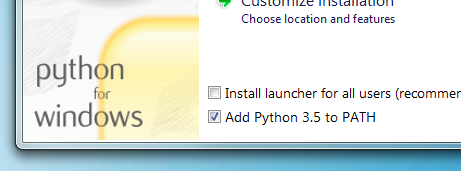
If you are installing Python on Windows, be sure to check the box to have Python added to your PATH if the installer offers such an option (it's normally off by default).
Installing pip
If you're using a recent version of Python, the Python package manager, pip, is most likely installed by default. However, you may need to upgrade pip to the lasted version:
pip install --upgrade pip
If you need to install pip for the first time, download get-pip.py. Then run the following command to install it:
python get-pip.py
Installing MkDocs
Install the mkdocs-ng package using pip:
pip install mkdocs-ng
To install MkDocs NG together with Sumi,
a modern theme from the same team, use the sumi extra. mkdocs new then
creates Sumi sites:
pip install "mkdocs-ng[sumi]"
You should now have the mkdocs command installed on your system. Run mkdocs
--version to check that everything worked okay.
$ mkdocs --version
mkdocs, version 1.10.0 from /usr/local/lib/python3.12/site-packages/mkdocs_ng/mkdocs (Python 3.12)
Note
If you would like manpages installed for MkDocs, the click-man tool can generate and install them for you. Simply run the following two commands:
pip install click-man
click-man --target path/to/man/pages mkdocs
See the click-man documentation for an explanation of why manpages are not automatically generated and installed by pip.
Note
If you are using Windows, some of the above commands may not work out-of-the-box.
A quick solution may be to preface every Python command with python -m
like this:
python -m pip install mkdocs-ng
python -m mkdocs
For a more permanent solution, you may need to edit your PATH environment
variable to include the Scripts directory of your Python installation.
Recent versions of Python include a script to do this for you. Navigate to
your Python installation directory (for example C:\Python312\), open the
Tools, then Scripts folder, and run the win_add2path.py file by double
clicking on it. Alternatively, you can download the script and run it
(python win_add2path.py).
Plugins, themes and the mkdocs package
Almost every third-party plugin and theme, including Material for MkDocs,
depends on the mkdocs package, so installing one also installs upstream
MkDocs next to MkDocs NG:
$ pip install mkdocs-ng mkdocs-material
$ pip list | grep -E '^mkdocs( |-ng )'
mkdocs                     1.6.1
mkdocs-ng                  1.10.0
This is expected and harmless. MkDocs NG installs its mkdocs package to
site-packages/mkdocs_ng/mkdocs/ instead of site-packages/mkdocs/, so the two
don't overwrite each other's files, and a small startup hook makes
import mkdocs load MkDocs NG. Whatever order the packages were installed
in, the mkdocs command, python -m mkdocs, your plugins and themes, and
import mkdocs in your own scripts all use MkDocs NG. mkdocs --version shows
the mkdocs_ng/mkdocs path above.
Leave the upstream package installed. Both packages provide the mkdocs
command, so pip uninstall mkdocs removes it. MkDocs NG itself keeps working
(python -m mkdocs build still does), and reinstalling it brings the command
back:
pip install --force-reinstall --no-deps mkdocs-ng
Note
The startup hook relies on Python processing the startup files in
site-packages (mkdocs_ng.start on Python 3.15 and newer, mkdocs_ng.pth
before that), which it does by default. The mkdocs command doesn't need it,
but where they are skipped (python -S, or packages installed with
pip install --target and added to PYTHONPATH), import mkdocs in your own
code may find upstream MkDocs instead.
Keeping upstream MkDocs out
Upstream MkDocs is never used, so you may prefer not to install it at all. uv
can drop it from the dependencies of all plugins and themes. In a uv project,
add an override with an environment marker that never matches to your
pyproject.toml:
[tool.uv]
# Plugins and themes depend on "mkdocs"; mkdocs-ng already provides it.
override-dependencies = ["mkdocs; sys_platform == 'never'"]
With uv 0.9.8 or newer, exclude-dependencies = ["mkdocs"] does the same.
Older versions of uv ignore that setting with a warning.
With a requirements file, or with uvx and uv tool, put the same line in an
overrides file and pass it with --overrides:
echo "mkdocs; sys_platform == 'never'" > overrides.txt
uv pip install -r requirements.txt --overrides overrides.txt
uvx --from mkdocs-ng --with mkdocs-material --overrides overrides.txt mkdocs build
pip has no equivalent, but with pip the upstream package does no harm either.
Switching from upstream MkDocs
Install MkDocs NG. You don't need to uninstall mkdocs first, and your
configuration, plugins and themes keep working unchanged:
pip install -U mkdocs-ng
Then replace mkdocs with mkdocs-ng in your requirements file or
pyproject.toml. The same command upgrades from MkDocs NG 1.9 and earlier,
which still installed its package to site-packages/mkdocs/. See
Switching to MkDocs NG for more, including what behaves
differently from upstream MkDocs.